# To install a package
install.packages('terra')
# To check if a package is installed
system.file(package = 'terra')Mapping plant-available soil water and nutrients

DOI: doi.org/10.17027/isric-cjs2-4391
Licence This tutorial is released under the GNU GPL v3.0 license. GNU GPL v3.0 is a strong copyleft license. This means that you may use the code and change/modify the code. If you distribute copies or modifications of the code, you are required to release these updates under the GPL v3 license.
Citation Leenaars, J.G.B and Ruiperez Gonzalez, M., 2022. Geostatistics for soil mapping. Tutorial, ISRIC-World Soil Information, Wageningen.
Introduction
This tutorial shows how soil qualities like the plant-availability of soil water and soil nutrients can be derived from readily available data on primary soil properties using the statistical software R. The tutorial also illustrates the relevance of these soil qualities to inform spatial land-use systems analysis as a basis for developing agricultural management advices. The methodology relies strongly on pedotransfer functions and other rule-based inferences. We illustrate the procedure for region in West Africa. Soil property data obtained from the Africa SoilGrids is used as the primary input. The participants will use these derived data to, at the end, compare the availability of nutrients from the soil (supply) with the soil water-limited requirements for nutrients of the crop (demand). This comparison forms the basis to formulate site-specific recommendations for soil fertility and crop nutrition management.
The tutorial consists of 3 parts:
- Chapter 1 Study area Study area
- Chapter 2 Plant-available soil water Mapping plant-available soil water
- Chapter 3 Mapping nutrients Mapping nutrients
These parts can be accessed via the links in the menu on the left side. Each part has its own R script file, which are made available with this tutorial.
After completing this tutorial you will be able to:
- Calculate soil water availability from soil data.
- Calculate root zone plant-available soil water holding capacity (RZ-PAWHC) from soil data.
- Calculate soil water holding capacity from soil data (PTF, Wosten et al., 2013).
- Calculate rootable depth from soil data (PTF, Leenaars et al., 2018).
- Calculate soil nutrient availability from soil data (QUEFTS, Sattari et al., 2014).
- Calculate nutrient deficiency (nutrient gap) from soil water-limited crop nutrient demand and soil nutrient supply.
Materials
Download
This tutorial is supported by a set of materials that are available in a dedicated folder on ISRIC’s file service and can be accessed here [TO DO: include URL to file folder on WEBDAV.]. The folder contains zip file soil_water_nutrients that includes all materials. Download this folder, save it in a dedicated folder on your computer and extract the zip file. This will give you a folder named soil_water_nutrients that includes a set of sub-folders and various files.
IMPORTANT:
Please carefully read the
READMEthat explains the folder structure and what can be found within these folders.Do not change any of the folder or file names, including the name of the ‘parent folder’
soil_water_nutrients. Changing folder and file names might cause the code stop running and produce errors.Do not change any code. The entire code should execute without errors. Changing the code might cause the code to stop running and produce errors. If you wish to experiment with the code (which we encourage!), please do so in a copy of the code file. The only code line you need to modify is the
setwd()function (further explanation below).
R, packages and external functions
Installation
The code must be executed with the R software for statistical computing. R can be downloaded here www.r-project.org.
We recommend to use a dedicated software that provides a more user-friendly Graphical User Interface (GUI) to R, such as RStudio. RStudio can be downloaded here download/rstudio-desktop.
All the packages and external functions required for this tutorial are listed below. However, the specific required packages and external functions are mentioned at the beginning of each section.
Packages
The required packages are:
- terra: Spatial Data Analysis
- leaflet: Create Interactive Web Maps with the JavaScript ‘Leaflet’ Library
- sf: Simple Features for R
- knitr: A General-Purpose Package for Dynamic Report Generation in R
In case a package is not installed, the install.packages() command can be used to download it.
Functions
This practice uses external functions that will be loaded at the beginning of each section as needed. These functions are stored in external R scripts and include:
VMCPTF_function.R: calculates volumetric soil moisture contents (VMC; 0-1 m3/m3) and plant-available water holding capacity (PAWHC; 0-1 m3/m3) for the fine-earth fraction of each depth interval (6) based on a PedoTransfer Function (PTF).EffPAWHC_function.R: calculates effective plant-available water holding capacity (0-1 m3/m3) by also considering volumetric coarse fragments content.RI_function.R: calculates rootability indices (0-100%) for each depth interval from a number of soil qualities or soil factors (derived from primary soil properties).Spline_function.R: interpolates these rootability indices for each factor from 6 standard depth intervals to 200 cm intervals.EvaluateRI_function.R: evaluates these rootability indices relative to threshold indices for each factor to determine if rootability is restricted by one or more of the soil factors and at which depths. Retained are the shallowest depths for each soil factor at which rootability is restricted beyond the threshold.Auxiliary_function.R: define few generic functions used to plot maps and to calculate statistics from the maps.
It is recommended to open the external functions to see what the functions do.
Setting the working directory
To be able to execute the code you have to tell R where it can find the materials on your computer. In other words, you have to set the working directory.
This can be done with the setwd() function. Within the () you define the full file path of the folder on your computer that contains the soil_water_nutrients folder that you have downloaded.
As an example, suppose one has created a folder called tutorials on the C-drive of a Windows computer, and has saved and unzipped the downloaded soil_water_nutrients files here.
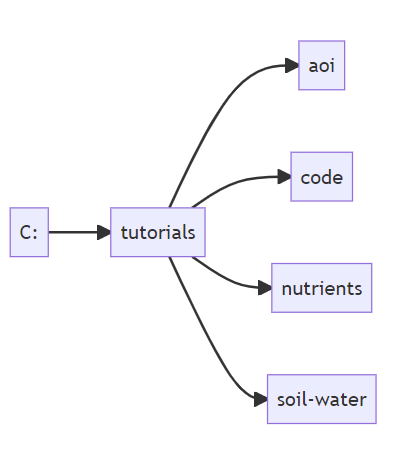
Then the working directory can be set as follows:
# Set the working directory pointing to the folder
# where the tutorial materials are stored
setwd("C:/tutorials/")
Note that quotation marks must be used to define the file path. Note further that the soil_water_nutrients folder must not be included in the file path if it follows the folder structure in the flowchart above.
IMPORTANT: the code line with the setwd() function is the only code line you need to modify in each of the scripts.
Alternatively, for RStudio users, the working directory can be set using specific options in the GUI. Instructions can be found here.
The working directory is set at the beginning of each chapter of this tutorial.
In case R returns an error after running the setwd() function, you probably have an error in the file path definition: check and correct.
The soil property data required as input for the various functions are read from the Africa SoilGrids and stored in a folder. The soil properties are named similarly as the variables throughout the different functions. However, keep in mind that unit conversions may be necessary.